MOBILedit Phone Manager 10.9.0 Free Download For PC
MOBILedit Phone Manager 10.9.0 Free Download for PC, latest full version. It is an offline installer setup for Windows 7, 8, and 10 (32/64 Bit) from Getallsoft.co
Overview
Managing smartphones and their data across several platforms has been difficult, especially for users switching from Android, iOS, or even older systems. MOBILedit Phone Manager 10.9.0, developed by Compelson Labs, provides an all-in-one management suite for phone data. It enables users to explore, back up, transfer, and organize their phone with ease. MOBILedit is a unified phone solution unlike many phone tools that only focus on Android or iOS. A wide variety of devices are supported by it, including iPhones, Android phones, Windows Phones, BlackBerry, Bada, Symbian, and even legacy feature phones.
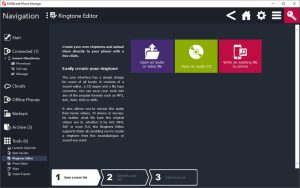
MOBILedit Phone Manager 10.9.0 Free Download for PC remains an adaptable and reliable phone management tool in 2025. It is a go-to solution for users who manage several devices, migrate data frequently, or require robust backup solutions due to its universal compatibility, extensive feature set, and easy-to-use interface. Cross-device, cross-platform support is delivered by MOBILedit while integrating modern conveniences such as cloud sync, SMS handling, and app management, unlike brand-specific tools. It caters to both casual users and professionals with modest system requirements and strong alternatives available.
Versions
- MOBILedit Phone Manager 2024
- MOBILedit Phone Manager 2023
- MOBILedit Phone Manager 2022
Uses
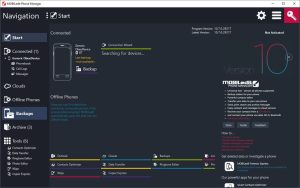
- By creating complete phone backups, safeguard your data. Restore entire profiles or selectively recover items such as photos, SMS, or contacts.
- With a drag-and-drop interface similar to Windows Explorer, access and transfer documents, videos, images, and music.
Features
- Its ability to support a wide variety of devices far beyond what most competitors cover is one of the standout strengths of MOBILedit. It works with Android smartphones Xiaomi, OnePlus, Samsung, Apple iPhones and iPads, Windows Phones, and BlackBerry OS devices. Older platforms such as Bada, Symbian, and even legacy feature phones.
- It turns your phone into a drive accessible through a Windows Explorer-style interface. With simple drag-and-drop, you can transfer videos, photos and music between phone and PC. Access notes, ringtones, documents and system files.
- The software offers extensive backup solutions. Low-level backups that save raw data for forensic-level detail. MOBILedit backup formats include structured backups that are easier to restore later.
- A powerful Contacts Optimizer is also included in MOBILedit that makes it more than a simple manager. Edit contacts directly from PC, merge duplicates automatically, fix invalid numbers, and internationalize numbers so they work across borders.
System Requirements
- OS: Windows 7 SP1 or later (32-bit and 64-bit).
- Processor: Intel Atom or Core i3, 1 GHz or faster.
- RAM: 2 GB.
- Storage: 500 MB for installation, extra for backups.
- Display: 1280×800 resolution.
Alternatives
- MobiKin Assistant for Android: For both Windows and Mac, it’s a powerful Android-focused tool. It provides one-click backup and restore with support for over 8000 device models.
- MyPhoneExplorer: This Windows app manages Android phones via Wi-Fi, USB or Bluetooth, free and feature-rich. It provides SMS, call log, contact and file management plus Outlook and Google syncing.
- Droid Explorer: This Windows-only tool grants advanced users direct access to Android’s file system (requires root). It offers both GUI and command-line interfaces.
MOBILedit Phone Manager 10.9.0 Free Download For PC
MOBILedit Phone Manager 10.9.0 Free Download For PC latest full version. It is an offline installer setup for Windows 7, 8, 10 (32/64 Bit) from getallsoft.co

Post Comment