iTop Screen Recorder – Download and install on Windows
Download iTop Screen Recorder – the best free screen recorder for PC – to record your screen with audio and webcam. Create high-quality screen recordings easily and download them for free from Getallsoft.co
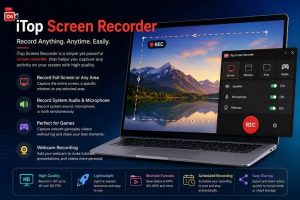
Overview of iTop Screen Recorder
iTop Screen Recorder is an intuitive, all-in-one software designed for capturing high-quality video and audio from your Windows PC. It allows users to record their entire screen, specific windows, or customized regions while simultaneously capturing webcam footage, system sounds, and microphone inputs. The tool is highly popular among gamers, educators, and content creators due to its built-in video editor, scheduled recording feature, and ability to export videos in multiple formats without lag. While it offers a powerful free version, advanced features like 4K recording, automated watermarks, and high frame rates require a paid upgrade.
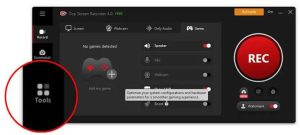
iTop Screen Recorder is a feature-packed multimedia tool for Windows that lets users capture desktop activity, game footage, webcam feeds, and audio with high flexibility. Built for tasks ranging from casual video creation to professional tutorials, it supports full-screen, partial-window, or fixed-ratio recording, alongside a dedicated Game Mode for smooth high-frame-rate gameplay capture. It also includes built-in AI enhancements like background removal, voice changing, noise denoising, and text-to-speech tools, making it a complete solution for recording, editing, and sharing polished videos
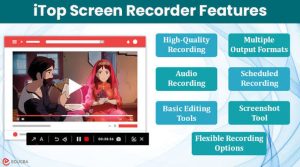
Key Features of itop screen recorder
- Flexible Screen Capture: Record the entire screen, a specific window, or any custom selected area across single or multiple monitors.
- High-Definition and Gameplay Recording: Support for 1080p and 4K resolution at up to 60/120 FPS, including a dedicated GPU-accelerated game mode for lag-free recording.
- Simultaneous Audio Recording: Capture system audio, microphone input, or both at the same time, complete with an Audio Denoiser to cut out background noise and mic echo.
- Webcam & Background Tools: Record your webcam with options to resize, or use AI Background Removal to blur, remove, or replace your background.
- Built-in Video Editors: Features a Quick Editor for fast trims, filters, and subtitles, alongside an Advanced Editor with a multi-track timeline, transitions, and effects.
- AI-Powered Tools: Includes AI Text-to-Speech with an expanded voice library of over 370 voices, voice changers, AI Unblur for sharpening visuals, and batch video compression (up to 70% size reduction).
- Screenshot & Annotation Tools: Take full-screen, selected-area, or scrolling screenshots while adding text, arrows, and shapes, plus mouse-click animations.
- Scheduled Recording: Set automated start and end times to capture live streams, webinars, or online classes.
System Requirements of itop Screen Recorder
- Operating System: Windows 11, Windows 10, Windows 8/8.1, or Windows 7 (64-bit processor required)
- Processor (CPU): 1 GHz or faster processor
- Memory (RAM): Minimum 512 MB to 2 GB of RAM (2 GB recommended for optimal performance)
- Hard Disk Space: At least 1,000 MB (1 GB) of free disk space
- Display: Minimum screen resolution of 1024 x 768 pixels
Free download of the iTop screen recorder
Download iTop Screen Recorder – the best free screen recorder for PC – to record your screen with audio and webcam. Create high-quality screen recordings easily and download them for free from Getallsoft.co

Post Comment