Flameshot Download for Windows
Free Download Flameshot for Windows PC. It is a cross-platform tool that takes screenshots with many built-in features to save you time. It is designed to simplify taking, editing, and sharing screenshots. And a free download from Getallsoft.co

Overview of Flameshot
It is a robust program tailored for capturing screenshots effortlessly. The tool’s highly customizable nature allows users to personalize their screenshot-taking experience according to their preferences. The interactive graphical user interface (GUI) provides intuitive controls for selecting capture regions, adjusting window size, and making quick edits.
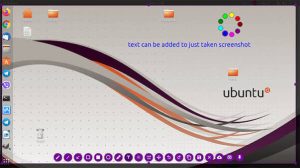
Flameshot is a reliable and efficient cross-platform screenshot tool that caters to users’ diverse needs. Its highly customizable features, in-app editing capabilities, and user-friendly design make it a standout choice in screenshot applications. Whether you’re a professional requiring detailed annotations or a casual user seeking simplicity, it is a versatile solution that delivers on both fronts.
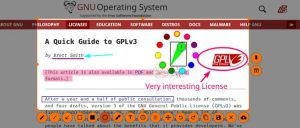
Key Features of Flameshot
- Screenshot Capture: Capture selected areas of your screen quickly.
- Annotation Tools: Add arrows, lines, text, and shapes to screenshots.
- Highlighting: Emphasize important areas of an image.
- Blur Tool: Hide sensitive information in screenshots.
- Clipboard Support: Copy captured images for quick sharing.
- Image Saving: Save screenshots in supported image formats.
- Custom Shortcuts: Configure keyboard shortcuts for faster capturing.
- Portable Version: Run the application using its portable ZIP package.
System Requirements for Flameshot
- Operating System: Windows 10 or Windows 11
- Processor: Compatible 64-bit Intel or AMD processor
- Architecture: Windows x64
- RAM: 4 GB recommended
- Storage: Approximately 200 MB for installation; additional space for the portable package
- Display: Standard Windows-compatible display
Flameshot Free Download
Free Download Flameshot for Windows PC. It is a cross-platform tool that takes screenshots with many built-in features to save you time. It is designed to simplify taking, editing, and sharing screenshots. And a free download from Getallsoft.co

Post Comment