Bulk Rename Utility Commercial Free Download 2027

Overview of Bulk Rename Utility
Bulk Rename Utility is an easy-to-use file rename program (a.k.a. file renamer). Renaming multiple files and multiple folders has never been easier! It has a small memory footprint, so it can be left running all the time without consuming all your memory. It started as a freeware Visual Basic tool, but as its popularity has grown, it has been completely rewritten in C++ to be robust, lightweight, and very fast! It can easily handle folders/discs containing over 100,000 entries… and batch rename 1,000s of files in seconds.
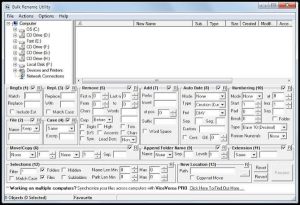
Bulk Rename Utility is a free file management software for Windows that lets you rename thousands of files and folders simultaneously with just a few clicks. It offers a wide range of customization options, including adding prefixes or suffixes, changing letter cases, replacing text, and using regular expressions. Users can also modify file timestamps, append sequential numbers, and extract metadata like EXIF tags from photos or ID3 tags from audio files. Because it provides a real-time preview of all changes before applying them, it helps you organize large digital collections quickly while preventing accidental naming mistakes.
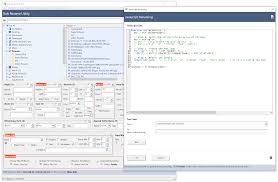
Features of Bulk Rename Utility
- Rename files, folders, or both.
- Remove, add, or change the text in the file names.
- Perform text substitution.
- Change the case of file names.
- Remove characters or words.
- Remove digits or symbols.
- Append or prepend text to file names.
- Append the parent folder’s name to a file name.
- Append dates to file names in many formats.
- Add text from the clipboard to multiple file names.
- Auto-number files with very flexible rules.
- Preview the new names before renaming.
- Sort the file details by any column.
- Save your renaming criteria into favorites
Technical Details and System Requirements
- Supported OS: Windows 11, Windows 10, Windows 8.1, Windows 7
- RAM (Memory): 2 GB RAM (4 GB recommended)
- Free Hard Disk Space: 200 MB or more
Free Download: Bulk Rename Utility
Free Download Bulk Rename Utility 4.1.0.1 Commercial Full Version – Latest Offline Installer – Rename multiple files with the click of a button. Free Download Bulk Rename Utility Commercial full version standalone offline installer for Windows allows you to easily rename files and entire folders based on extremely flexible criteria. And Free download from Getallsoft.co

Post Comment