WinCompose Download for Windows – Latest Version
WinCompose 0.9.11 is a free and open-source Windows utility that makes it easier to type special characters, accented letters, mathematical symbols, and emojis using simple keyboard combinations. It adds a Compose key feature to Windows, allowing users to enter characters that may not be available directly on their keyboards. And it’s a free download from Getallsoft.co

Overview of WinCompose
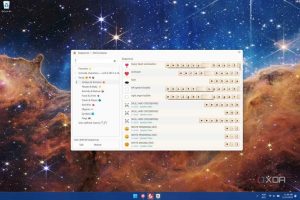
WinCompose is a free, open-source utility that brings a Linux-style compose key to Windows, allowing you to type over 4,000 special characters, accented letters, symbols, and emojis using intuitive key sequences. By pressing and releasing a designated trigger key—which defaults to the Right Alt key—you can combine standard characters like ‘ and e to effortlessly produce é, or < and 3 for ♥, without memorizing complex Alt codes. The lightweight program runs quietly in your system tray and includes a searchable sequence browser so you can quickly look up shortcuts on the fly.
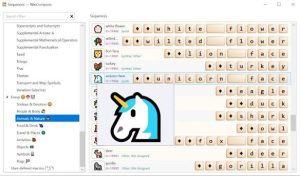
WinCompose is a lightweight keyboard utility designed for people who frequently type special characters in documents, emails, programming projects, and online content. It uses short key sequences to insert Unicode characters without requiring users to switch keyboard layouts. You can also remap the trigger key and define your own custom character rules or text-expansion macros through a simple configuration file.
Key Features Of WinCompose
- Special Character Input: Type accented letters and symbols using simple keyboard sequences.
- Emoji Support: Insert supported emojis directly through keyboard combinations.
- Unicode Support: Access a wide range of Unicode characters.
- Compose Key: Use Right Alt as the default Compose key.
- Custom Sequences: Configure personalized character combinations.
- Multiple Languages: Supports characters used in various languages.
- Lightweight Application: Uses a small installation package.
- System Tray Integration: Access settings and controls from the Windows notification area.
- Portable Version: Available as a portable package.
- Open-Source Software: Source code is available on GitHub.
System Requirements For WinCompose
- Operating System: Windows
- Processor: Compatible Windows-supported processor.
- RAM: Standard Windows application memory requirements.
- Storage: A few megabytes of available space.
- Additional Requirements: Physical keyboard and compatible Windows environment.
WinCompose – Download Free
WinCompose 0.9.11 is a free and open-source Windows utility that makes it easier to type special characters, accented letters, mathematical symbols, and emojis using simple keyboard combinations. It adds a Compose key feature to Windows, allowing users to enter characters that may not be available directly on their keyboards. And it’s a free download from Getallsoft.co


Post Comment