ScreenToGif 2.43.2 + Portable Free Download 2027
Overview of ScreenToGif
ScreenToGif is a free, open-source Windows application that allows users to record a selected area of their screen, a live webcam feed, or a digital sketchboard. It features a built-in frame-by-frame editor where you can easily crop, resize, add text or captions, and remove unwanted frames from your recording. Once editing is complete, you can export your project into multiple formats, including GIF, APNG, WebP, or standard video files like MP4. Lightweight and available as a portable app, it is an ideal tool for quickly creating software tutorials, bug reports, and short animations without watermarks.
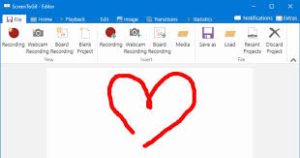
ScreenToGif is a free, open-source Windows application that lets you record your screen, webcam, or a digital sketchboard and export the capture directly as an animated GIF or video. It features an integrated, frame-by-frame editor where you can easily crop, resize, add text captions, and apply visual transitions to polish your recordings. Lightweight and available as a portable version that requires no installation, it offers a fast and accessible workflow without adding watermarks. This makes it an ideal utility for creating quick software tutorials, bug reports, and lightweight visual demonstrations.
Features of ScreenToGif
- Record your screen and save it as a GIF-looped animation or a video.
- Pause and continue to record, or start over by discarding the recording.
- Move the window around to record what you want; it stays on top.
- You can add Text, Subtitles, Title Frames, Borders, Watermarks, Drawings, etc.
- Crop and Resize.
- Remove frames that you don’t want.
- Select a folder to save the file automatically, or select one before encoding.
- Add the system cursor to your recording.
- Very small-sized and portable executable.
Technical Details and System Requirements
- Supported OS: Windows 11, Windows 10, Windows 8.1, Windows 7
- RAM (Memory): 2 GB RAM (4 GB recommended)
- Free Hard Disk Space: 200 MB or more
Free Download ScreenToGif
Free Download ScreenToGif 2.43.2 Latest Offline Installer – Screen & webcam recorder with an integrated editor. Free download of the latest version of the ScreenToGif standalone offline installer for Windows. It is used as a screen and webcam recorder with an integrated editor.And Free download from Getallsoft.co

Post Comment