MacOS Catalina 10.15 (19A583) Mac App Store Download
macOS Catalina 10.15 (19A583) Mac App Store: Download the latest full version. It is an offline installer setup of MacOS Catalina 10.15 for Windows 7, 8, and 10 (32/64 Bit) from Getallsoft.co
Overview
Apple’s macOS Catalina 10.15 (19A583) is a highly commendable operating system that demonstrates exceptional creativity and effectiveness. Catalina consistently transforms the Mac user experience with its effortless integration, extensive functionalities, and enhanced security measures. Obtaining macOS Catalina 10.15 is a simple and easy procedure. Customers can find the download and installation option for Catalina by going to the Mac App Store.
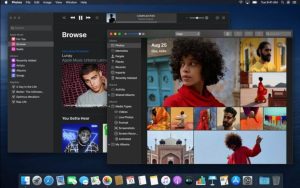
It is available for free download; therefore, it is guaranteed to be accessible to all Mac users. Users can get new features and capabilities of MacOS through a seamless download and installation process, provided they have a dependable internet connection. In general, macOS Catalina 10.15 (19A583) is a prime example of Apple’s commitment to user experience, security, and innovation. Because of its robust security protections, wide range of functionality, and easy download procedure, Catalina remains a major player in the Mac environment.
Versions
- macOS Mojave (version 10.14)
- macOS High Sierra (version 10.13)
- macOS Sierra (version 10.12)
Features
- Sidecar is a feature that Catalina introduces that allows iPads to be easily combined with Macs to operate as graphic tablets or additional screens.
- With Catalina’s Screen Time function, users can effectively monitor and manage their screen time. This feature provides insightful data on how the program is used.
- With Catalina’s introduction of Voice Control, users can only use voice commands to control their Macs.
- This inclusive feature makes multitasking easier and allows you to perform several tasks without using your hands.
- Building upon the success of Find My iPhone, Catalina introduces Find my, an integrated program that
- tracks the whereabouts of lost or stolen Apple products, including Macs, iPhones, and related devices.
- Catalina includes Apple Arcade, a membership service that gives gamers access to a hand-picked selection of excellent games.
System requirements
- Processor: macOS Catalina requires a Mac with a 64-bit processor
- Memory (RAM): A minimum of 4 GB of RAM is recommended
- Storage Space: 12.5 GB of available storage space for the installation
Alternatives
- macOS Big Sur: Big Sur replaces Catalina and offers improved performance, cutting-edge privacy features, and a refreshed look.
- Windows 10: For those who require Windows-only apps or want a different user experience, Windows 10 presents a tempting choice.
- Linux: Keeping up with the spirit of open-source software, Linux distributions such as Fedora and Ubuntu offer an extraordinary level of customization and flexibility.
macOS Catalina 10.15 (19A583) Mac App Store Download
Free Download macOS Catalina 10.15 (19A583) full version latest. It is an offline installer setup of MacOS Catalina 10.15 for Windows 7, 8, and 10 (32/64 Bit) from Getallsoft.co


Post Comment