Creality Print Download Latest Version

Overview of Creality Print
It is an official slicing solution created specifically for Creality FDM 3D printers. It acts like the control center of your 3D printing process, helping you convert digital 3D models into instructions that a printer can understand. Think of it as the translator between your creative design and the physical object that appears on the printer bed.
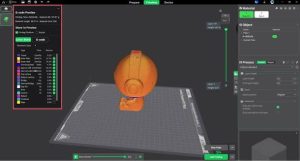
The software brings together everything needed for a smooth printing workflow. From importing models to adjusting slicing settings and controlling prints remotely, the entire process happens inside a single interface. This makes it very useful for beginners as well as experienced makers who want a reliable tool for preparing their prints.
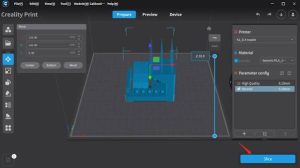
The tool also connects with the Creality Cloud ecosystem, allowing users to manage their printers, access models, and monitor prints online. With remote Wi-Fi management and real-time control, it turns a regular 3D printer into a smart, connected device.
Key Features Of Creality Print
-
3D Model Slicing: Convert digital 3D models into printable G-code instructions.
-
Multiple File Formats: Import STL, OBJ, STEP, STP, and supported project files.
-
Custom Print Settings: Adjust layer height, printing speed, temperature, and infill density.
-
G-Code Generation: Prepare machine instructions for compatible 3D printers.
-
Support Generation: Create support structures for complex models and overhanging sections.
-
Model Arrangement: Position, rotate, scale, and organize multiple models on the build plate.
-
Printer Management: Select and configure compatible Creality 3D printers.
-
Remote Printing: Send print jobs to supported printers through network connections.
-
Print Monitoring: Monitor compatible 3D printers and printing progress.
-
Filament Configuration: Customize material and filament settings for different printing projects.
-
3D Preview: Examine sliced layers and printing paths before starting a print.
-
Creality Cloud Integration: Access supported online models and cloud printing features.
-
Multi-Color Printing: Configure supported printers for multi-color printing workflows.
System Requirements For Creality Print
- Operating System: Windows 11 / 10 / 8.1 / 7
- Processor: Minimum 1 GHz Processor (2.4 GHz recommended)
- RAM: 2GB (4GB or more recommended)
- Free Hard Disk Space: 500MB or more is recommended
Creality Print Free Download
Free download Creality Print 7.3.1 Latest full version – Control and monitor your 3D printer.Free Download Creality Print for Windows PC. It is a powerful slicing solution designed to prepare, preview, and control 3D printing tasks with ease. And Free download from Getallsoft.co



Post Comment