Anaconda For macOS Free Download
Anaconda for macOS: Free Download Full Version latest. It is an offline installer and a torrent dmg setup for Apple macOS from Getallsoft.co

Overview – Anaconda for macOS Free Download
Anaconda for macOS Free Download is the ultimate solution for Mac users looking for a comprehensive Python distribution and data science platform. Anaconda simplifies package management, environment creation, and workflow setup, if you are a beginner learning Python or an experienced data scientist handling large-scale analytics. Anaconda allows developers to start coding instantly without complex installations by providing Python, R, Jupyter Notebook, Spyder IDE, and above 1500 pre-installed libraries.
One major reason professionals prefer Anaconda for macOS Free Download is its ability to create isolated environments.
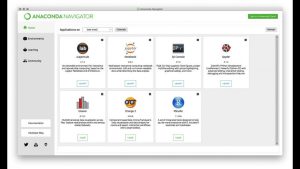
This feature ensures that several projects with various dependencies do not conflict, which is crucial when working with machine learning frameworks, scientific computing packages, or deep learning libraries like TensorFlow and PyTorch. Anaconda’s built-in package manager, Conda, enables users to install, update, and manage packages with a single command and remove the frustration of manual dependency handling. Another major advantage of Anaconda for macOS Free Download is its ease of integration with data visualization and analytics tools. Mac users can create interactive coding environments to run Python code, visualize results, document workflows, and share reproducible research with Jupyter Notebook.
Versions
- Anaconda (2020)
- Anaconda (2021)
- Anaconda (2022)
Key Features
- Complete Python and R Distribution: Anaconda comes with Python, R support, and many helpful libraries that make it perfect for developers, students, researchers, and data analysis.
- Built-in Package Manager: It also includes Conda, a package and environment manager that helps you install, update, and manage libraries without dependency problems. Conda works across macOS, Windows, and Linux
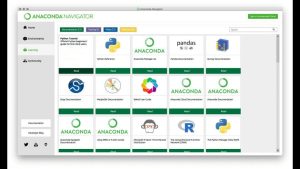
- Anaconda Navigator GUI: Anaconda Navigator provides an easy graphical interface to launch apps, manage packages, create environments, and update tools without using Terminal commands.
- Jupyter Notebook and JupyterLab Support: You can also write, test, and document Python code using JupyterLab and Jupyter Notebook. These tools are beneficial for coding practice, research, analysis, and machine learning projects.
- Thousands of Open-Source Packages: Anaconda gives access to above 8000 open source data science and AI packages, including libraries for data exploration, machine learning, and deep learning.
- Machine Learning and AI Libraries: It supports highly regarded AI and ML tools like TensorFlow, Keras, PyTorch, XGBoost, and scikit-learn that make it suitable for model training, prediction, and AI experiments.
System Requirements
- Operating System: macOS 10.14 Mojave or later (Intel & Apple Silicon compatible)
- Processor: Intel Core i3 or higher / Apple M1/M2
- RAM: Minimum 4GB (8GB recommended for heavy ML workflows)
- Storage: 3GB free disk space for installation and libraries
- Internet: Required for downloading packages and updates
Alternatives
- Miniconda
- PyCharm
- JupyterLab standalone
- Enthought Canopy
- ActivePython
Anaconda for macOS Free Download
Anaconda for macOS Free Download Full Version latest. It is an offline installer and a torrent dmg setup for Apple macOS from Getallsoft.co
Post Comment