Download BlueStacks App Player – Free – latest version
BlueStacks is an easy-to-use App Player that runs Android OS and apps on Windows PCs with an instant switch between Android and Windows, and a free download of the latest version from Getallsoft.co
Overview Of BlueStacks App Player
BlueStacks App Player is a powerful software application that enables users to run Android applications on their computers. With its user-friendly interface and versatile capabilities, BlueStacks has become a popular choice for gamers, app developers, and anyone who wants to enjoy their favorite mobile apps on a larger screen.
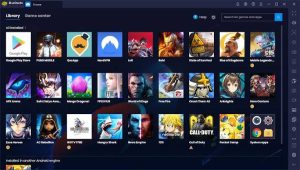
One of the key advantages of BlueStacks is its compatibility with a wide range of operating systems, including Windows and macOS. This allows users to access thousands of apps from the Google Play Store, as well as other app stores and websites. Whether you want to play games, stream videos, or use productivity tools, BlueStacks has you covered.

Key Features Of BlueStacks App Player
- Allows you to run Android applications on your computer
- Supports multi-window, so you can use multiple applications at a time
- Provide custom settings for resolution and RAM allocation
- Combines the built -in KeyMapping to control the game
- Provide cloud connections for synchronous applications for cross-device play
- Compatible with Windows and Mac OS.
BlueStacks App Player – System Requirements
- Operating System: Windows 10/11 (64-bit)
- Processor: Intel or AMD processor with virtualization support
- RAM: 4 GB minimum
- Storage: At least 5 GB of free disk space
- Graphics: Intel/NVIDIA/AMD GPU with updated graphics drivers
- Display: 1280 × 720 resolution or higher
- Internet: Stable internet connection required for downloading apps, updates, and online features.
Free Download BlueStacks App Player
BlueStacks is an easy-to-use App Player that runs Android OS and apps on Windows PCs with an instant switch between Android and Windows, and a free download of the latest version from Getallsoft.co

Post Comment