Droid Explorer 0.8.8.10 Free Download For PC
Droid Explorer 0.8.8.10 Free Download for PC: latest full version. It is an offline installer setup for Windows 7, 8, and 10 (32/64 Bit) from Getallsoft.co
Overview
For Windows users who want an easier way to manage their Android devices, Droid Explorer is a lightweight yet powerful tool designed. Version 0.8.8.10 continues the tradition of providing smooth integration between a PC and Android smartphones or tablets. Droid Explorer enables advanced management features like application installation, system file browsing, and shell execution, unlike conventional file transfer software. Droid Explorer provides a familiar Windows-like interface to manage files and applications with Android devices increasingly used as both communication hubs and productivity tools.
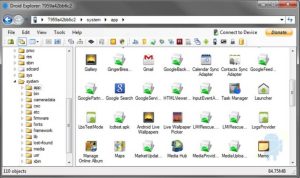
For developers, testers, and power users who want to control their Android devices directly from their computer without relying on complex command-line tools, it is beneficial for them. For managing Android devices directly from a Windows PC, Droid Explorer is a versatile and reliable tool. It is particularly valuable for testers, developers, and power users due to its combination of file management, application control, system access, and debugging features.
Versions
- Droid Explorer 2009
- Droid Explorer 2010
- Droid Explorer 2011
Uses
- Users can move, rename, copy, or delete files on their Android device directly from their PC just like handling files in Windows Explorer.
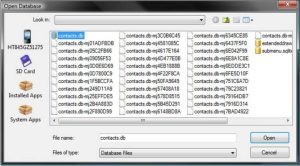
- Droid Explorer enables browsing and editing of system directories for rooted devices, something not possible with standard Android PC suites.
Features
- Droid Explorer enables you to control and manage your Android device directly from a Windows computer. Without touching the device itself, you can explore your device’s files and folders.
- Users can copy, browse, move, or delete files on their Android device. Transferring files between PC and device is made simple and intuitive due to drag-and-drop functionality.
- Install and uninstall Android applications (.apk files) from your PC. This is especially beneficial for bulk installation or removing apps without navigating the device.
- Droid Explorer automatically detects and updates the interface when you connect or disconnect your Android device. This makes the process smooth.
- From your computer, take screenshots of your Android device, useful for presentations, troubleshooting, or sharing device content.
System Requirements
- Operating System: Windows XP, Vista, 7 (32-bit or 64-bit)
- Processor: Pentium 4 or equivalent
- RAM: 512 MB
- Hard Disk Space: 50 MB of free space
Alternatives
- MyPhoneExplorer: It’s a long-standing free tool for Windows that supports USB, Wi-Fi and Bluetooth connections. You can sync contacts, messages, files, call logs and even manage notifications.
- AirDroid: A versatile freemium tool available on Windows, macOS and via web. It provides screen mirroring, file syncing, cloud backup, app management, SMS control and even IFTTT integrations, all wireless.
- ApowerManager: It offers media management, backup, restore and connection through USB or Wi-Fi, and it’s a polished Android manager for Windows. It is great for users managing several devices.
Droid Explorer 0.8.8.10 Free Download For PC
Droid Explorer 0.8.8.10 Free Download For PC latest full version. It is an offline installer setup of Droid Explorer 0.8.8.10 for Windows 7, 8, 10 (32/64 Bit) from Getallsoft.co

Post Comment