Shadow Copy Explorer Download New Version
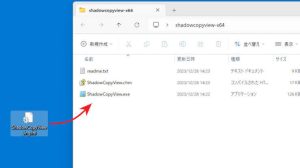
Overview of Shadow Copy Explorer
It is a user-friendly tool that simplifies managing your PC’s Shadow Copies and System Restore points. It enables you to easily interact with these critical system backups, making it a valuable addition to your toolkit. This innovative utility can effortlessly recover specific files without a full system restore. Moreover, it allows you to create, delete, and monitor restore points and shadow copies, giving you complete control over your system’s data protection. Here are some key features and functionalities of the tool:
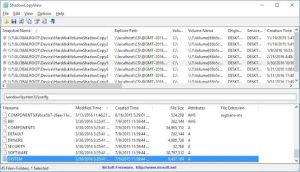
Access and Mount Snapshots: One of the primary uses of the tool is to access and mount older snapshots of your system. Whether you’re dealing with a malfunctioning driver or accidentally deleted files, you can explore previous states of your system and retrieve important data.
Create Restore Points: It allows you to create restore points.
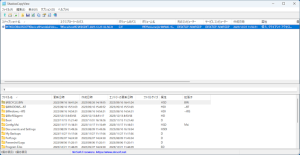
Key Features of Shadow Copy Explorer
- Interactive Typing Lessons: Practice through beginner, intermediate, and advanced courses.
- Virtual Keyboard: Displays keyboard keys and highlights the correct finger positions.
- Typing Speed Tests: Measure typing performance using speed and accuracy results.
- Progress Tracking: Review performance through statistics, tables, and charts.
- Multiple Keyboard Layouts: Supports QWERTY, AZERTY, Dvorak, Colemak, and other layouts.
- Custom Lessons: Create personalized typing courses using your own text.
- Portable Version: Run the application directly from a USB drive without installation.
- Classroom Mode: Allows teachers to manage students and monitor learning progress.
- Multi-Language Support: Provides different interface languages and keyboard courses.
System Requirements
- Operating System: Windows 11/10/8.1/8/7
- Processor: Multicore Intel Series or above, Xeon or AMD equivalent
- RAM: 2GB (4GB or more recommended)
- Free Hard Disk Space: 100MB or more recommended
Shadow Copy Explorer Free Download
Free download Shadow Copy Explorer 1.7 Latest version – Manage PC’s Shadow Copies and System Restore points. Free Download Shadow Copy Explorer for Windows PC. It is a powerful tool that allows you to seamlessly navigate and manipulate system restore points or Shadow Copies/Previous Versions on various Windows operating systems, including Windows Vista, 7, 8, 10, 11, Server 2008, and more. And Free download from Getallsoft.co
Post Comment