Fast Screen Recorder 2024 Free Download
Fast Screen Recorder 2024 Free Download: latest full version. It is an offline installer setup of Fast Screen Recorder 2024 for Windows 7, 8, and 10 (32/64 Bit) from Getallsoft.co

Overview
For creating tutorials, preserving webcasts, capturing video calls, and recording gameplay. Screen recording has become an essential tool in this modern digital age. Seamless and efficient recording is offered by Fast Screen Recorder 2024 as a prominent choice in this domain. It is designed to cater to both professionals and beginners due to the presence of versatile and user-friendly screen recording software. High quality and minimal performance impact are provided to the user to capture their screen activities. Professional presentation to education content creation is provided by this software due to its various recording modes. Anybody needing high-quality recording can use the enhanced tool of Fast Screen Recorder 2024.
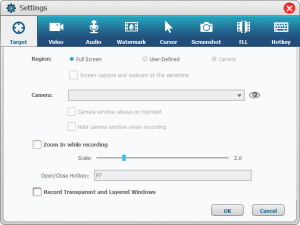
Due to its user-friendly interface, varied versions, and extensive features, it caters to a large audience from casual users to professionals. There are a number of available options, but Fast Screen Recorder 2024, due to its balanced performance, ease of use, and enhanced features, makes it a standalone choice in the screen recording software market. Whether for entertainment or professional use, this software meets the need to create high-quality, impactful recordings.
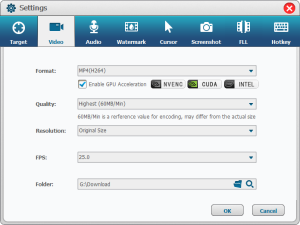
Versions
- Free Version
- Pro Version
- Business Version
Uses
- Teachers and educators can create detailed tutorials and lectures, capturing both screen activity and webcam input to provide a comprehensive learning experience.
Features
- Supports 4k and HD resolution, providing excellent crystal-clear video quality
- To suit different needs, it offers full- screen windows and custom area recording modes.
- Captures system audio, microphone input, or both simultaneously, making it ideal for commentary and voice-over applications
- Includes tools for real-time annotation and drawing on the screen during recording, which is essential for tutorials and presentations. To cut, trim, merge, and enhance recordings provides a suite of editing tools.
System Requirements
- Operating System:- Windows 7/8/10/11 (32-bit and 64-bit)
- Processor:- Intel Core i3 or equivalent
- RAM: 4 GB (8 GB recommended for HD/4K recording)
- Hard Disk Space: 500 MB for installation; additional space required for recordings
Alternatives
- OBS Studio 2023: It is a free and open-source option. It is popular for its advance and live streaming. It offers a high degree of customization, making it popular among gamers and professionals.
- Camtasia Studio 9: Premium recording software for screen recording and video editing that also provides enhanced tools for editing. Regarded for creating professional-grade tutorials and presentations.
- Snagit: Developed by Techsmith, it is a user-friendly tool that focuses on screen capture and light editing. It is ideal and awesome for creating visual guides and instructions.
Fast Screen Recorder 2024 Free Download
Free Download Fast Screen Recorder 2024 full version latest. It is an offline installer setup of Fast Screen Recorder 2024 for Windows 7, 8, 10 (32/64 Bit) from Getallsoft.co

Post Comment