WinBox Free Download MikroTik Router Management Tool
WinBox is a free Windows-based configuration utility developed by MikroTik for administering RouterOS devices through a graphical management interface. Distributed as a small executable, it runs natively on Windows and can potentially operate on Linux or macOS using Wine and a free download from Getallsoft.co

Overview Of WinBox
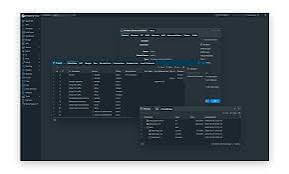
WinBox is a small, standalone utility used to administer and configure MikroTik RouterOS through a fast and intuitive graphical user interface (GUI). It operates as a lightweight wrapper for the web-based console, offering the same functions while providing a smoother, native desktop experience. Network administrators rely on it to manage routing, firewalls, bandwidth, and wireless configurations without needing complex command-line knowledge. The software is highly secure, supports Mac-Winbox connectivity for discovering neighboring MikroTik devices without an IP address, and is officially available for Windows, Linux, and macOS.
Key Features Of WinBox
- Graphical RouterOS Management: Configures routing, firewalls, VLANs, wireless interfaces, DHCP, and DNS without relying solely on the command-line interface (CLI).
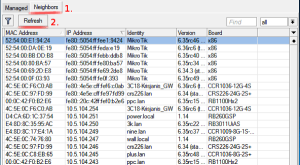
- Instant Device Discovery: Scans and connects to MikroTik and compatible devices across a local network using Layer 3 IP/IPv6 addresses or Layer 2 MAC addresses via the Neighbors tab.
- Real-Time Monitoring: Tracks live network traffic, CPU load, memory usage, and general device health metrics.
- File Management & Backups: Supports drag-and-drop file transfers for firmware updates and configuration backups, plus export options for text-based scripts.
- Scripting & Automation: Includes built-in scripting tools to streamline routine network administration and workflow automation.
- Multi-Session & Multi-Platform Support: Manages multiple router sessions simultaneously and runs natively on Windows, as well as on Linux and macOS using Wine.
- Encrypted Security: Utilizes Extended Validation (EV) certificates, ECSRP authentication, and AES-128 encryption to prevent man-in-the-middle attacks.
System Requirements For WinBox
These are general guidelines; requirements can vary by WinBox release.
-
Operating System: Compatible Windows version; check the specific release for support
-
Processor: Compatible Intel or AMD processor
-
RAM: 2 GB or more recommended
-
Storage: Small amount of free space for the application
-
Network: Network connection to a compatible MikroTik device
-
Additional Requirement: A MikroTik router running a compatible RouterOS version
Free Download WinBox
WinBox is a free Windows-based configuration utility developed by MikroTik for administering RouterOS devices through a graphical management interface. Distributed as a small executable, it runs natively on Windows and can potentially operate on Linux or macOS using Wine and a free download from Getallsoft.co


Post Comment